
Microsoft Dynamics 365 Business Central Inventory Management & Scanning
Business Central Core Function
Gain greater control of inventory, improve stock visibility and connect purchasing, sales, warehousing and manufacturing.
Microsoft Dynamics 365 Business Central brings inventory information together with the operational processes that affect it.
Give your team greater visibility of stock and supply requirements while connecting inventory with purchasing, sales, manufacturing, warehousing and finance.
Add barcode-enabled processes to help bring Business Central closer to the point where inventory is physically handled.
Know what you have, where it is and what you need
Accurate inventory information sits at the heart of an efficient supply chain.
Business Central helps create a connected view of inventory by bringing stock information and related business processes together within the same ERP environment.
Instead of managing inventory requirements across disconnected spreadsheets and systems, organisations can connect inventory with purchasing, customer demand, manufacturing and warehouse operations.
This provides a stronger foundation for making decisions around stock availability, replenishment and order fulfilment.
CORE BUSINESS CENTRAL INVENTORY FUNCTIONS
Inventory & Stock Management
Create a single source of truth for your inventory
Manage your inventory information within the same system used by purchasing, sales, manufacturing and financial management.
A connected approach helps your team work from consistent information while providing greater visibility of incoming and outgoing inventory.
Use Business Central to support:
- Inventory availability
- Stock movements
- Purchasing and replenishment
- Sales demand
- Inventory locations
- Transfers
- Manufacturing requirements
- Inventory costing
Improve visibility of available stock
Successful inventory management isn't simply about knowing what's sitting on a shelf.
Your team also needs to understand the demand and supply affecting inventory.
By connecting inventory with sales, purchasing and manufacturing, Business Central creates a foundation for better-informed stock and supply decisions.
Need to improve your purchasing processes?
See how Business Central connects procurement with inventory requirements and incoming supply.
Improve replenishment and supply planning
Move beyond maintaining inventory requirements manually and establish a more structured approach to replenishment.
Connected inventory and planning information helps teams to consider current supply and demand when planning inventory requirements and future supply.
This can help your business focus on maintaining appropriate inventory while responding more effectively to changing requirements.
See Inventory Requirements and Plan Supply
Use the Business Central Order Planning view to visually demonstrate how inventory planning information can be brought together to support purchasing and replenishment decisions.
Need more advanced inventory planning?
Extend Business Central with additional inventory planning tools to improve visibility of future stock requirements and potential shortages.
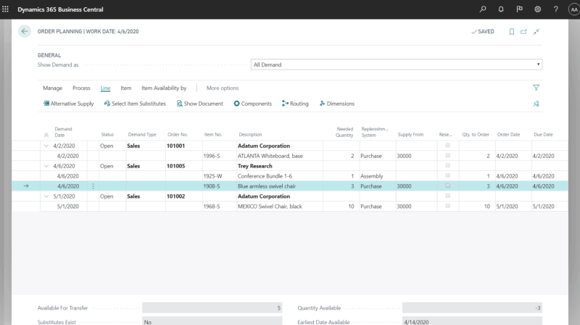
Business Central Order Planning helps bring demand and supply requirements together to support more informed replenishment decisions.
Bring barcode scanning into your inventory processes
Where people are physically handling products, mobile and barcode-enabled processes can help connect inventory activity with Business Central.
Business Central provides barcode-scanning capabilities through its mobile application and AL development environment. It also provides support for device-camera scanning as well as integration scenarios involving dedicated Android barcode-scanner devices.
Supported barcode formats include QR Code, Data Matrix, UPC, EAN, Code 39, Code 93, Code 128, PDF 417 and AZTEC, among others.
Scan using compatible mobile devices
Depending on the solution design, scanning can use a supported phone or tablet camera or a dedicated scanning device.
Put Business Central closer to where the work happens
Inventory isn't managed from a desk alone.
Stock is received, counted, moved, picked and handled throughout your operation. Mobile solutions can give staff access to Business Central-supported inventory processes closer to where that work happens.
For businesses with more advanced scanning requirements, specialist Business Central warehouse applications can further extend mobile inventory and barcode processes.
Need More Advanced Mobile Warehouse Scanning?
Extend Business Central with specialist mobile warehouse functionality for organisations that require more sophisticated scan-driven warehouse processes.
Maintain visibility as your operation grows
As organisations grow, inventory often becomes more complicated.
Products may be stored and handled across multiple locations, warehouses or operational areas. Your inventory system needs to provide the information required to coordinate inventory across the business.
Business Central gives you an ERP foundation where inventory can remain connected with purchasing, sales, manufacturing and financial information as operational requirements grow.
Improve product traceability
For many of the food, beverage, manufacturing and distribution businesses ERP365 works with, knowing precisely which inventory is being handled can be just as important as knowing the overall quantity.
Why Businesses Choose Business Central for Inventory Management
Greater Stock Visibility
Bring inventory and the processes affecting it together within your Business Central environment.
Connected Operations
Connect inventory with purchasing, sales, warehousing, manufacturing and financial information.
Mobile & Barcode Options
Extend inventory processes towards mobile users and scanning devices. Business Central's barcode capabilities support scenarios using mobile-device cameras and dedicated Android barcode scanners.
Scalable Inventory Management
Build an inventory management platform that can be extended as product volumes, locations and operational requirements become more complex.
Better Replenishment Decisions
Use connected supply-and-demand information as the foundation for more informed inventory planning.
Business Central inventory expertise for New Zealand and Australian businesses
ERP365 helps New Zealand and Australian businesses get greater control and visibility over inventory with Microsoft Dynamics 365 Business Central.
Successful inventory management requires more than entering stock into an ERP. Purchasing, sales demand, replenishment, manufacturing, locations, warehousing, scanning and financial processes all need to work together.
ERP365 can help you configure and extend Business Central around the inventory processes that matter to your operation.
Extend Business Central Inventory Management
Mobile WMS
Take mobile inventory management further with barcode-enabled warehouse processes.
Inventory Planning
Improve visibility of future inventory requirements and anticipated stock shortages.
Inventory Counting
Simplify inventory counting processes and improve stock accuracy.
Advanced Warehouse Management
Extend Business Central where your operation requires more sophisticated warehouse processes.
Barcode Generation
Create barcode labels and support barcode-enabled inventory processes within your Business Central environment.
Is Business Central Inventory Management Right for Your Business?
Business Central may be a good fit if your organisation needs to:
Improve stock and inventory visibility
Connect inventory with customer demand
Improve replenishment processes
Introduce barcode-enabled inventory processes
Connect inventory activity with financial information
Connect purchasing and inventory
Manage inventory across different locations
Support manufacturing inventory requirements
Reduce reliance on inventory spreadsheets
Extend into more advanced mobile warehouse solutions
FREQUENTLY ASKED QUESTIONS
Yes. Microsoft Dynamics 365 Business Central provides inventory management capabilities that connect stock with key areas of your business, including purchasing, sales, manufacturing, warehousing and finance.
This gives your team a more connected view of inventory and helps reduce reliance on separate spreadsheets and systems. For businesses with more complex requirements, Business Central can also be extended with specialist inventory planning, scanning and warehouse solutions.
Ready to take greater control of your inventory?
Talk to ERP365 about creating a more connected approach to inventory management, from stock visibility and replenishment through to mobile and barcode-enabled processes.