
Microsoft Dynamics 365 Business Central Purchasing & Procurement
Business Central Core Function
Make smarter purchasing decisions and connect procurement with inventory, supply planning and finance.
Microsoft Dynamics 365 Business Central gives growing businesses the tools to manage purchasing from supplier information and purchase orders through to receiving, invoicing and financial posting.
Because purchasing works within the same ERP platform as inventory and finance, teams can manage procurement using connected operational and financial information. Microsoft notes that posted purchase invoices update inventory levels and contribute purchasing costs and inventory values to financial KPIs.
Bring purchasing, inventory and finance together
Effective procurement requires more than simply creating purchase orders.
Your purchasing team needs visibility into what needs to be ordered, who you're buying from, what has been received and how purchasing activity affects inventory and financial performance.
Business Central connects these processes, helping your team move from purchasing through receipt and invoicing without relying on disconnected systems and spreadsheets. Purchase orders can also manage situations involving partial receipts.
CORE BUSINESS CENTRAL PURCHASING FUNCTIONS
PURCHASE ORDER MANAGEMENT
Manage purchasing from order through to receipt
Create and manage purchase orders within Business Central and maintain the information your purchasing and finance teams need throughout the procurement process.
Purchase orders can include the supplier, items or services, quantities, costs and other purchasing information. When goods or services are received, purchasing transactions can be posted into the connected Business Central environment.
Use purchase orders to help:
- Manage goods and services purchased from suppliers
- Record quantities and purchasing costs
- Handle full and partial receipts
- Connect received inventory with purchasing
- Maintain a clear purchasing record
- Support downstream accounts payable processes
SUPPLIER & VENDOR MANAGEMENT
Keep supplier information in one place
Build structured vendor records in Business Central to support consistent procurement processes.
Vendor cards provide the foundation for purchasing transactions and allow teams to maintain the supplier information needed when creating purchase orders and invoices.
This gives purchasing and finance teams a common source of supplier information rather than maintaining separate records across multiple systems.
PURCHASE APPROVAL WORKFLOWS
Put the right controls around purchasing
Create approval processes that help your business maintain control over purchasing before commitments are made.
Business Central supports approval workflows for purchase processes. Microsoft gives the example of requiring approval from an accounting manager for large purchases.
For growing organisations, that provides an important balance between purchasing efficiency and financial control.
Benefits can include:
- Greater control over purchasing
- More consistent internal processes
- Clearer approval responsibilities
- Reduced reliance on manual approval processes
- Better visibility between purchasing and finance
Connect what you order, receive and invoice
Purchasing does not end when the purchase order is sent.
Business Central helps connect purchasing with the receipt of goods and subsequent supplier invoicing.
Where only part of an order is received, purchase orders enable the business to record partial receipts, while purchase invoices record purchasing costs and accounts payable.
This creates a more connected flow between:
Purchase → Receive → Invoice → Finance
PROCUREMENT & SUPPLY PLANNING
Know what to buy and when you need it
Purchasing becomes considerably more powerful when it is connected to your wider inventory and supply requirements.
Business Central's planning tools can help purchasers work with purchase requirements and suggested changes to supply. The Planning Worksheet can produce purchase suggestions that purchasers can review and use within their planning process.
This creates a closer connection between inventory demand and purchasing activity.
Help your purchasing team:
- Respond to changing supply requirements
- Improve inventory replenishment decisions
- Coordinate purchasing with production requirements
- Review purchase requirements by supplier
- Improve visibility of expected receipts
- Reduce dependence on manually maintained purchasing spreadsheets
Need greater control over stock availability?
See how Business Central connects purchasing with inventory management and replenishment.
PURCHASING ANALYTICS
Turn purchasing data into better decisions
Business Central provides analytical tools for gaining insights into purchasing activity, including purchasing analytics, ad-hoc analysis, built-in purchasing reports and the Power BI Purchasing app.
By connecting purchasing information to the wider ERP environment, managers can get a clearer picture of procurement activity and its relationship with inventory and financial performance.
Get a Clear Overview of Purchasing Performance
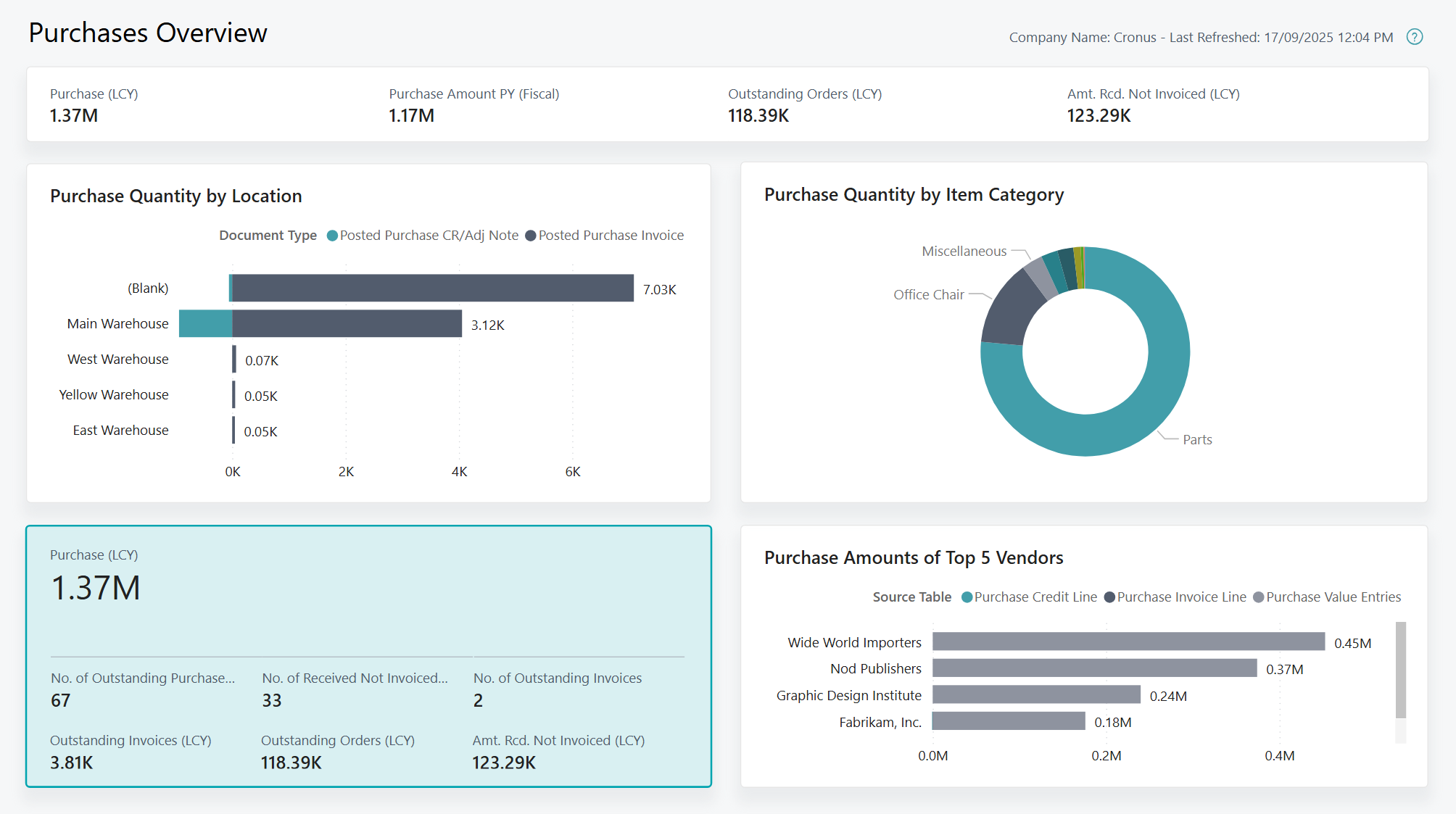
Get a consolidated view of purchasing activity and key procurement measures with Business Central and Power BI.
Compare Purchases Against Budget
Compare purchasing activity against budget to give decision-makers greater visibility of purchasing performance and expenditure.
Compare actual purchasing activity with budget using Power BI purchasing analytics.
Why Businesses Choose Business Central for Procurement
Smarter Purchasing Decisions
Connect purchasing with inventory, planning and finance to give buyers better information when making purchasing decisions.
Smarter Purchasing Decisions
Connect purchasing with inventory, planning and finance to give buyers better information when making purchasing decisions.
Understand What's Driving Purchasing Activity
Go beyond headline figures and explore the factors contributing to purchasing activity, helping your team investigate procurement data from different perspectives.
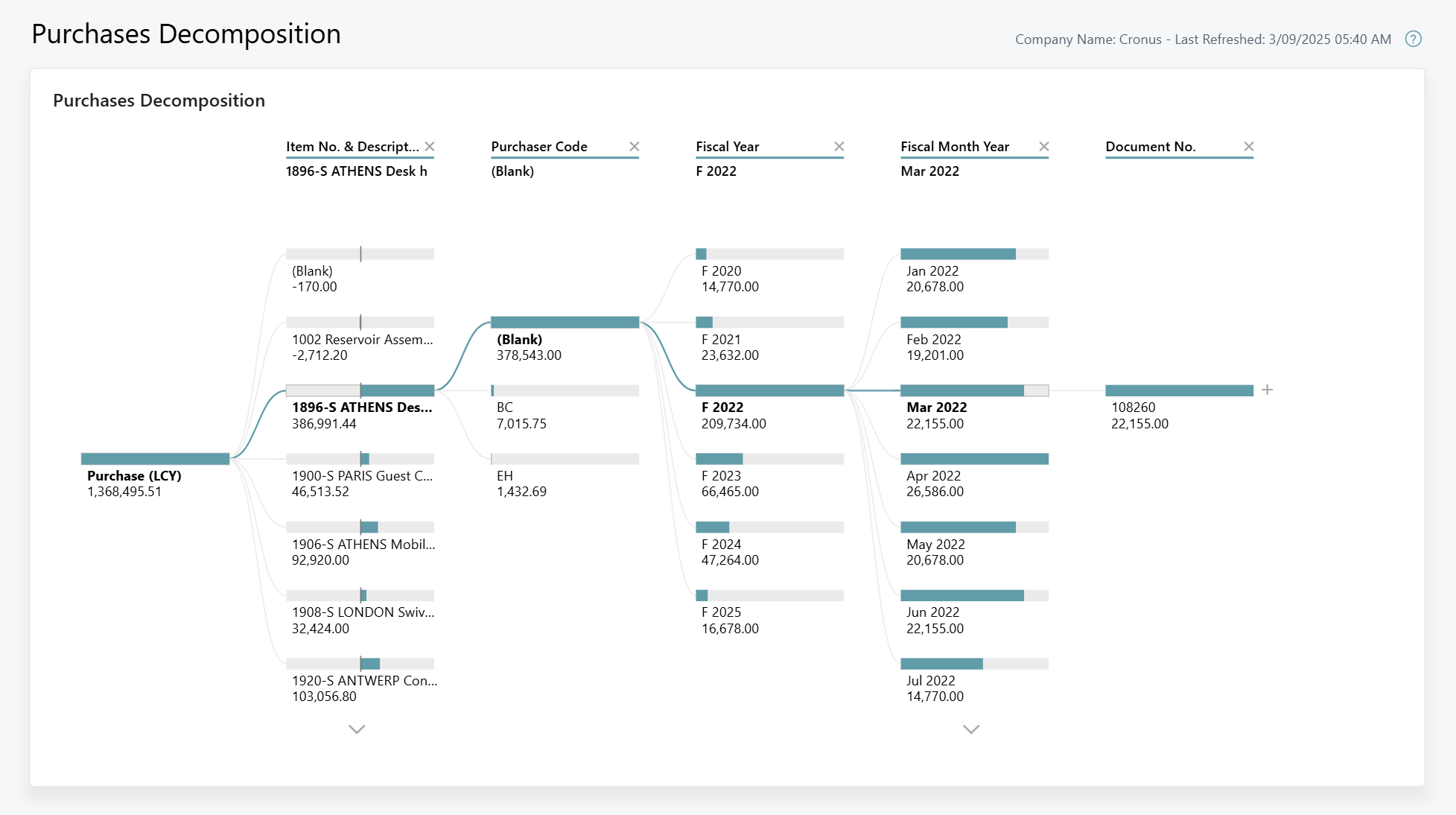
Explore purchasing data in greater detail with Power BI decomposition analysis.
Less Manual Administration
Maintain vendors, purchasing documents, receipts and supplier invoices within the same Business Central environment rather than across disconnected systems.
Greater Control
Use structured purchasing processes and approval workflows to give your organisation greater control over purchasing activities.
Connected Financial Information
Purchasing transactions feed into the broader financial and inventory environment, improving visibility of costs and business performance. Microsoft specifically notes that purchasing costs and resulting inventory values contribute to financial KPIs in Business Central.
Improved Inventory Visibility
Connect procurement with inventory requirements so purchasing teams have greater visibility of incoming supply.
Track Purchasing Performance Over Time
See how purchasing activity changes between reporting periods, helping your business identify trends and put current procurement performance into context.
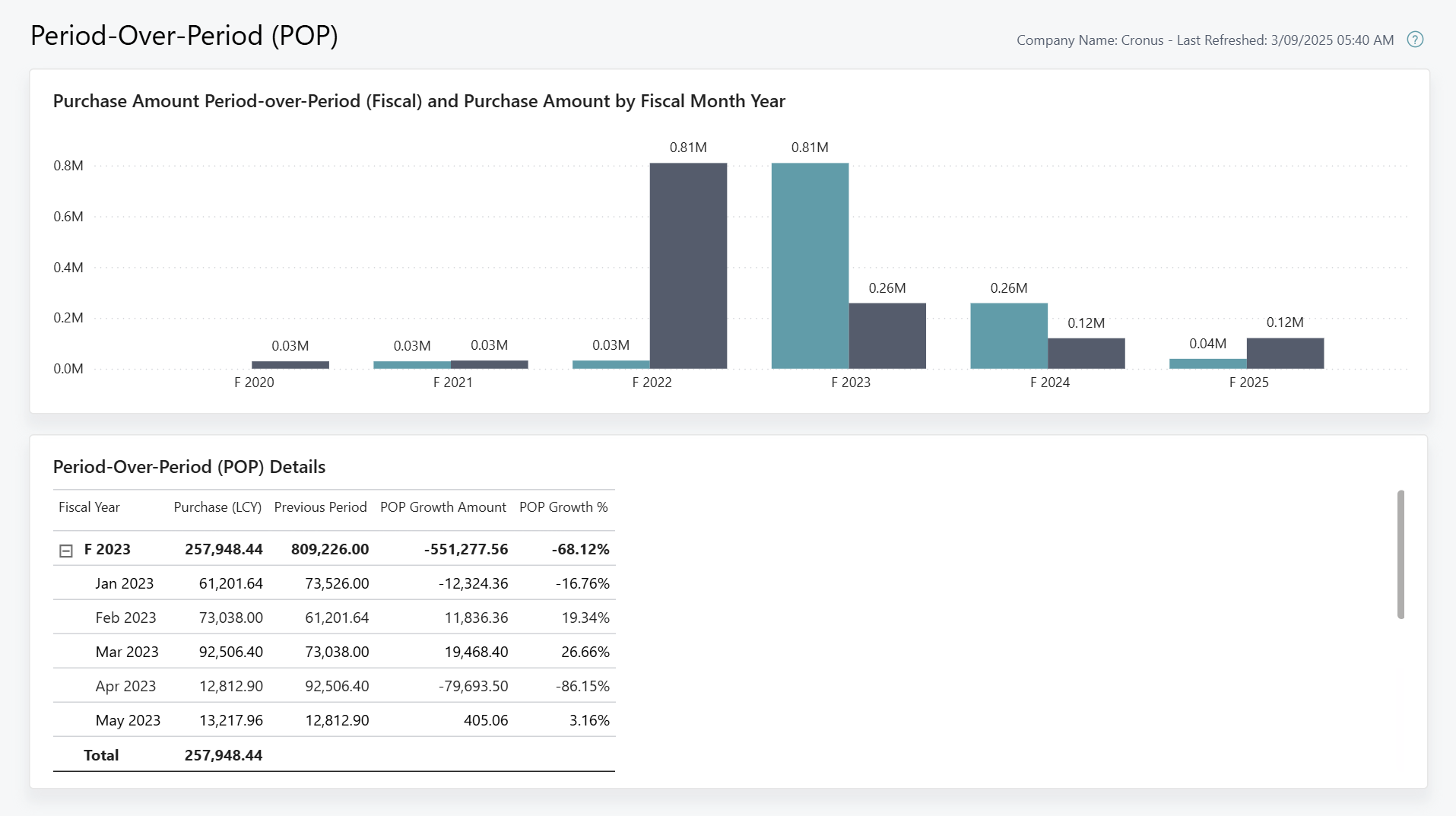
Compare purchasing performance across periods with Business Central and Power BI.
Business Central procurement expertise for New Zealand and Australian businesses
ERP365 helps New Zealand and Australian organisations bring purchasing, inventory, supply chain and finance together with Microsoft Dynamics 365 Business Central.
Getting purchasing right isn't simply about configuring purchase orders. Supplier records, inventory policies, approvals, purchasing processes, financial controls and reporting all need to work together.
ERP365 can help you configure Business Central around the way your organisation purchases, receives and manages goods and services.
EXTEND BUSINESS CENTRAL PROCUREMENT
Document Capture
Extend Business Central with intelligent tools for managing Accounts Payable processes.
Payables Agent
Extend Business Central with intelligent tools for managing Accounts Payable processes.
Landed Cost Management
Gain greater control over additional costs associated with purchasing and importing inventory.
Quality Management
Extend procurement processes where incoming goods require additional quality control and inspection processes.
Inventory Planning
Improve purchasing decisions with greater visibility of future stock requirements, anticipated shortages and replenishment needs.
Is Business Central Procurement Right for Your Business?
Business Central may be a good fit if your organisation needs to:
Manage suppliers and purchase orders
Create purchase approval processes
Improve replenishment and purchasing planning
Remove disconnected purchasing spreadsheets
Create a scalable purchasing process as your business grows
Connect purchasing with inventory
Manage receipts and purchasing invoices
Gain better visibility of purchasing activity
Connect procurement with financial management
FREQUENTLY ASKED QUESTIONS
Yes. Microsoft Dynamics 365 Business Central includes purchasing capabilities for managing vendors, purchase orders, purchase invoices, approvals and purchasing analytics.
Ready to take greater control of purchasing?
Talk to ERP365 about creating a more connected purchasing process, from suppliers and purchase orders through to inventory, invoicing and reporting.